Skip to content

An online booking system that fills your diary while you sleep

Every enquiry that could have been a booking is a phone call someone has to return. We build an online booking system into your site, with live times from the booking or practice software you already run. Intake gets asked once, and the confirmation goes out straight away.

  • Connected to your booking software
  • Intake asked once
$6.01
per enquiry on a client build
187
enquiries from $1,124 of ad spend
96
Lighthouse performance on a launched build
100+ clients
AHPRA and TGA ad policy
Australian owned
Google Partner, certified
Meta Partner, certified
Privacy Act compliant
TikTok Ads, certified

We'd rather show you than tell you.

Partner badges you can look up, numbers straight from client dashboards, and the businesses whose websites we've built. Here's the scoreboard so far.

$6.01 per enquiry on a client build 96 Lighthouse performance score 400+ checks before every release Built to WCAG 2.2 AA

What we do

What is your website for?

What clients say about the build

Two people sitting outdoors looking at a tablet together, one of them using a power wheelchair
“The entire process was seamless, easy, and incredibly user-friendly. They were patient and flexible with all the changes and back-and-forth... Most importantly, they absolutely nailed the brief.”
Read the case study

5 stars Google review

Shallon Duck Google review

What is included

A booking is an enquiry that finished itself.

We build booking flows to 4 rules. They suit the person booking and the team running the diary.

  1. Times are read from your booking software. A slot that shows can be booked, and one that has gone never appears.

    How a build runs
  2. Intake answers go into the client record before the visit. Nobody fills in the same form again at reception.

    See the work
  3. Pre-screening questions choose the right appointment type and length. They also say plainly when someone should call instead.

    The proof we show
  4. If you have more than one clinic, the flow asks where first. Then it shows only the people and times at that location.

    Questions people ask

The argument

Why a booking flow beats a game of phone tag.

Availability

Website Development Group

Live times from your system

Only slots that can be booked.

Generalist build

Request a time

A preferred day, then phone tag.

Intake

Website Development Group

Asked once, before the visit

The answers land in the client record.

Generalist build

A clipboard on arrival

The same details, written twice.

Screening

Website Development Group

Questions that route

The right appointment type, first time.

Generalist build

Booked into the wrong slot

Found out at the front desk.

Confirmation

Website Development Group

Sent the moment it's booked

Date, place and what to bring.

Generalist build

A reply when someone gets to it

No proof the booking exists.

Changes

Website Development Group

Rescheduled from the email

The freed time goes straight back up.

Generalist build

Call during business hours

No-shows instead of cancellations.

How it runs

From first call to launch, minus the headaches.

You see the page plan before design starts, and the design before we build. So there are no nasty surprises at the end.

Week 1

Discovery

We learn how your diary runs: appointment types, lengths and who can see whom. We also check what your booking software lets a website read and write.

What we deliver

  • Appointment type map
  • Booking software review
  • Integration access agreed
  • Fixed quote with line items
A business owner laughing during a video strategy call on his laptop, in a light-filled room with a window behind him

Weeks 1 to 2

Flow

We draw the booking path step by step. The intake and screening questions are written and approved before anything is designed.

What we deliver

  • Step-by-step flow
  • Intake questions approved
  • Screening and routing rules
  • Confirmation and reminder copy
A crowd of people crossing a busy city street, shot from above with their movement blurred

Weeks 2 to 4

Design

We draw time pickers, forms and confirmations for a phone first. Every step works by keyboard and screen reader.

What we deliver

  • Time picker design
  • Intake form design
  • Error and empty states
  • Contrast measured to AA
Three colleagues around a table of laptops, one standing and gesturing at a screen while the other two look on

Weeks 4 to 6

Integrate

We connect the flow to your booking or practice software through its own interface. Every booking is written back and logged.

What we deliver

  • Live availability
  • Bookings written to your system
  • Confirmation emails
  • Delivery log and retries
Blue and lime patch cables plugged into a rack panel and sweeping away in order

Weeks 6 to 7

Launch

We test bookings in every appointment type, then cancel and reschedule them. Only then does the flow go live and the old request form retire.

What we deliver

  • Test bookings end to end
  • Reschedule and cancel tested
  • Booking events tracked
  • Handover and training
A shop owner standing in his plant shop holding a potted plant, shelves of plants behind him

The long read

What an online booking system has to get right.

Online booking is easy to add and hard to get right. Here's where the difference shows, for the person booking and for the person running the diary.

A request form only looks like booking

A form that asks for a preferred day and time still leaves the booking to your team.

Someone has to read it, check the diary and call back. By then the time they wanted has often gone, and what follows is phone tag.

Live availability cuts that loop. If a time shows, it can be taken, and the booking is confirmed before the visitor closes the tab.

When people try to book
Outside business hours During business hours

Illustrative: a shape booking demand often takes, not a measurement. We look at your own enquiry times in discovery.

Intake belongs before the visit

Most intake gets done twice. First loosely online, then again on a clipboard in the waiting room.

We ask once, before the visit, and write the answers into the client record. That way the first minutes of the appointment go on the appointment.

Intake stays to what the practitioner needs for that appointment type, and nothing is asked twice.

Screening should send people somewhere useful

Pre-screening questions exist to put someone in the right appointment. That means the right type, the right length and the right person.

Where the answers mean online booking won't suit, the flow should say so plainly and give a phone number. A dead end helps nobody.

On a healthcare site the wording stays factual. The questions describe the appointment and never promise an outcome.

Your booking software stays in charge of the diary

We don't build a second calendar. The diary lives in one place, the system your team already uses.

The website reads availability from it and writes bookings back through its own interface. Reception sees online bookings exactly where they see every other one.

If a write ever fails, it's logged and retried, and your team hears about it before the client arrives.

Show us how your diary works.We'll show you how people could book into it.

  • Connected to your booking software
  • Intake asked once

Case studies

Our work, so you can
judge for yourself.

Speech Clinic

A speech therapy website built to rank in the suburbs it serves

A search-led structure giving each therapy and each mobile service area its own page to land on.

Scope of work

  • Search architecture
  • Page templates
  • Local SEO
Read the case study
7areas
a page each
10suburbs
service areas

MedPrescribe

An e-prescribing platform website that sells like a product

An e-prescribing platform positioned as a product, automating booking through to delivery.

Scope of work

  • Product positioning
  • UX writing
  • Design system
Read the case study
6steps
booking to delivery
70%
less admin, their figure

First Class First Aid

A first aid course website employers can book in one go

A booking site built around the codes employers send, not the course names.

Scope of work

  • Booking flow
  • Course templates
  • Schema
Read the case study
6units
accredited, a page each
3yr
certification explained

Ovaya

A fertility treatment website that answers every question before the consult

An at-home fertility treatment page answering what arrives, when, and who watches each cycle.

Scope of work

  • Content strategy
  • Page design
  • Compliance review
Read the case study
2min
to self-administer
1wk
consult to doorstep

Full Body MRI

A full body MRI website patients find by the condition they search

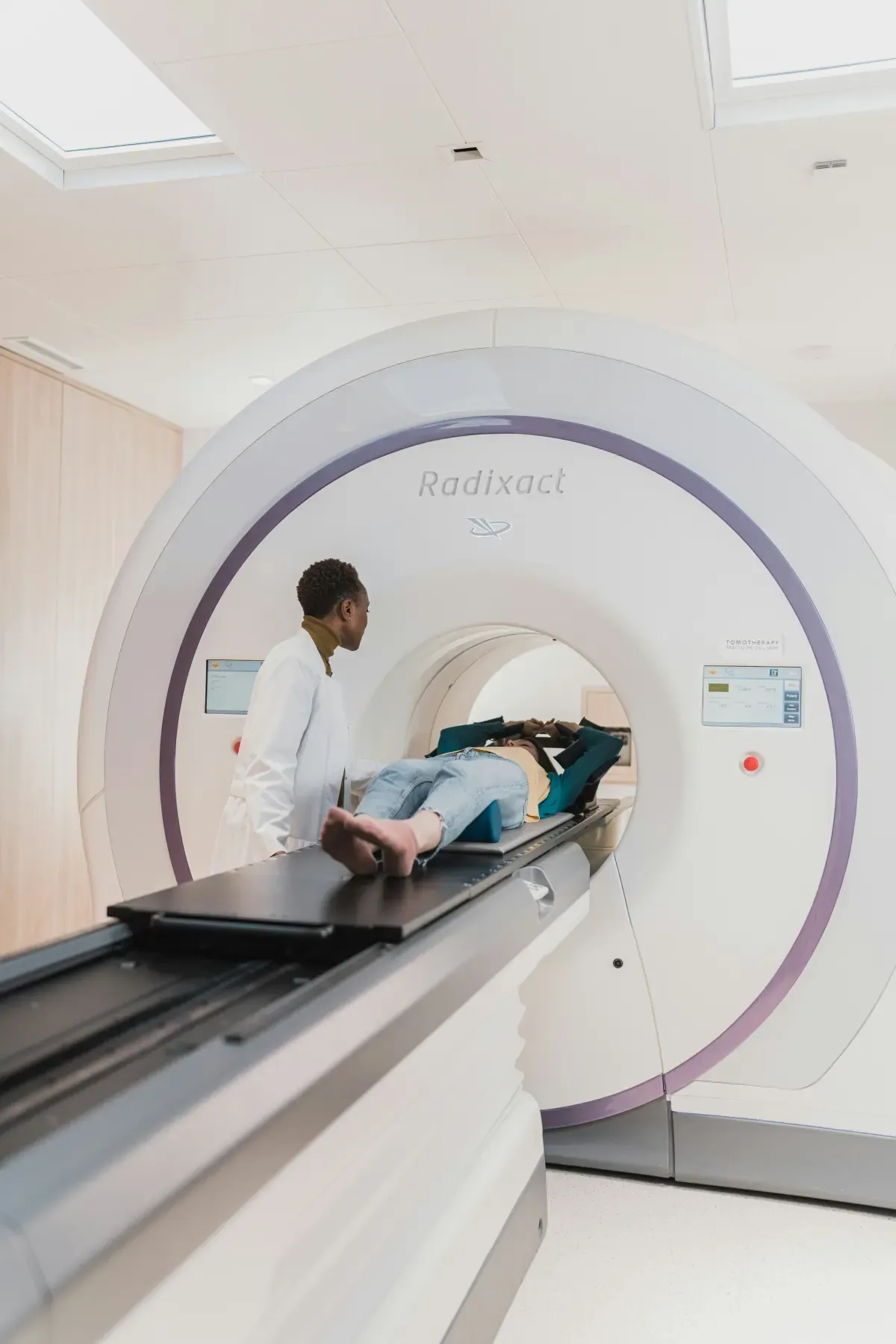
A whole-body screening scan surfaced by the organ or condition people actually search for.

Scope of work

  • Information architecture
  • Copywriting
  • Technical SEO
Read the case study
14organs
in a single scan
500+
conditions screened

Search proof

The scoreboard, straight from client dashboards.

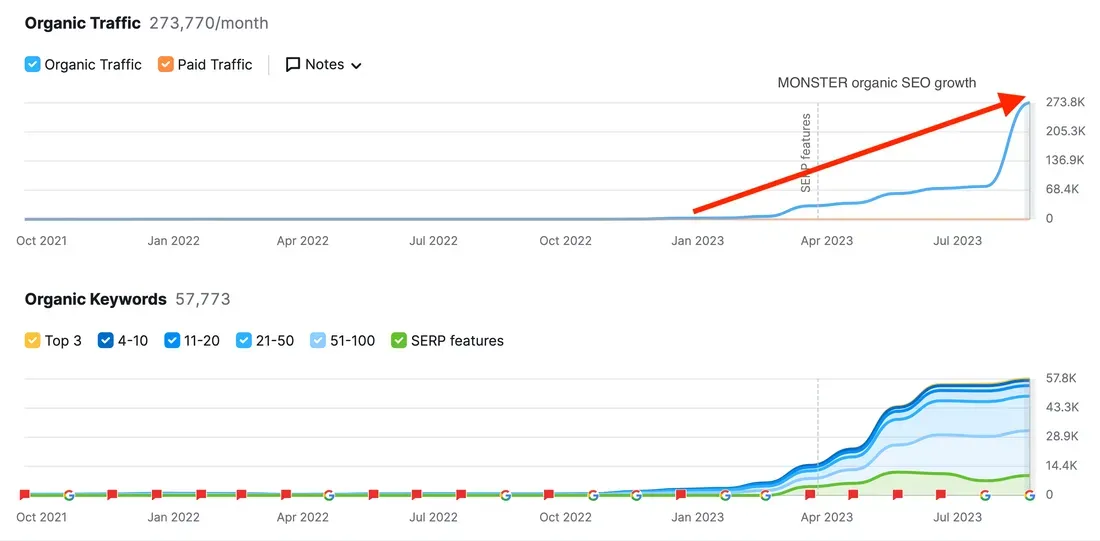
SEO dashboard showing organic traffic climbing from near zero to 273,770 monthly visitors with 57,773 ranking keywords
SEO: organic traffic grew from near-zero to 273,770 monthly visitors and 57,773 ranking keywords in under 12 months.
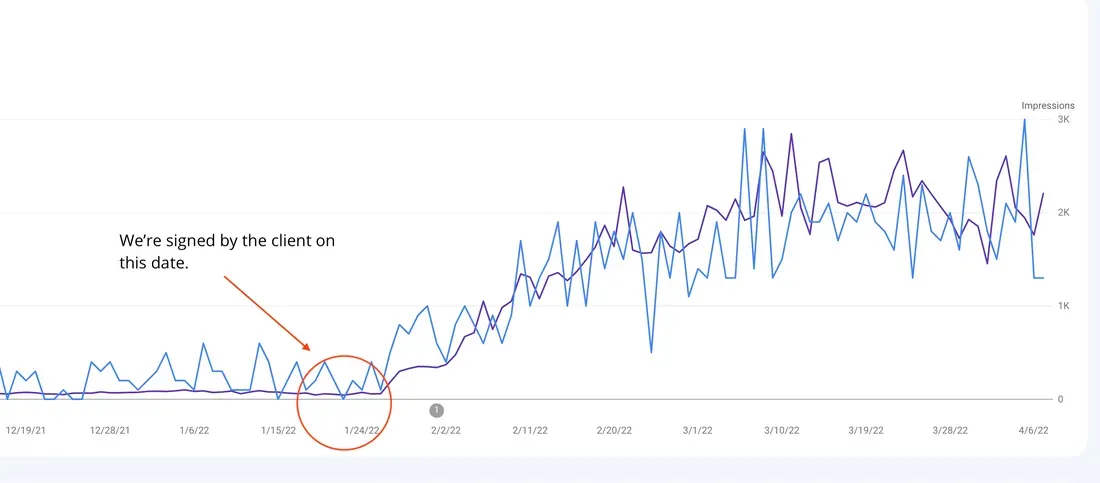
Google Search Console graph showing impressions surging from near-zero to over 3,000 per day within 10 weeks
Search Console: impressions surged from near-zero to over 3,000 a day within 10 weeks of engagement (2022).
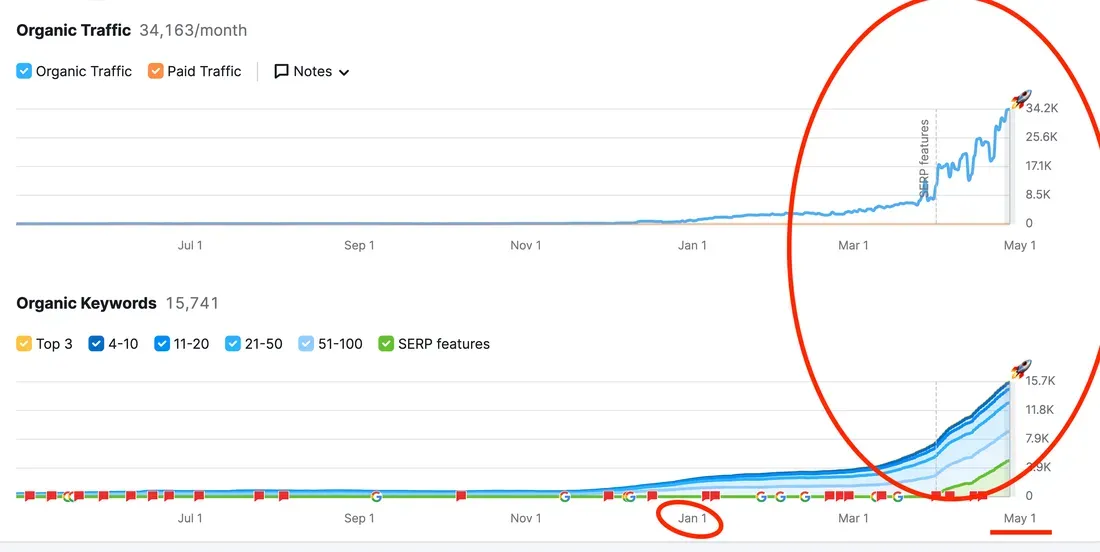
SEO dashboard showing organic traffic spike from near zero to 34,163 monthly visitors with 15,741 ranking keywords
SEO: organic traffic grew from near-zero to 34,163 monthly visitors with 15,741 ranking keywords.
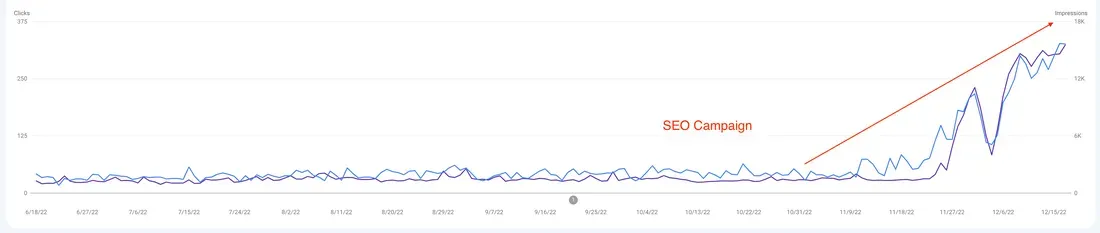
Google Search Console graph showing clicks rising from under 50 to over 300 per day within three months
Search Console: clicks grew from under 50 a day to over 300, and impressions from 2K to 18K, within 3 months.
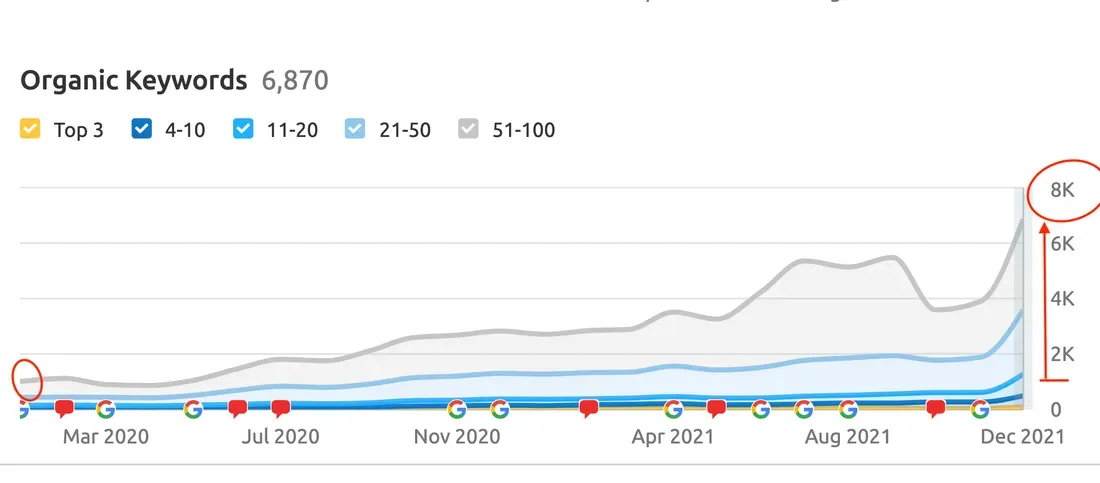
SEO organic keywords chart showing growth from under 500 to 6,870 ranking keywords between 2020 and 2021
SEO: organic keywords grew from under 500 to 6,870 ranking keywords between March 2020 and December 2021.
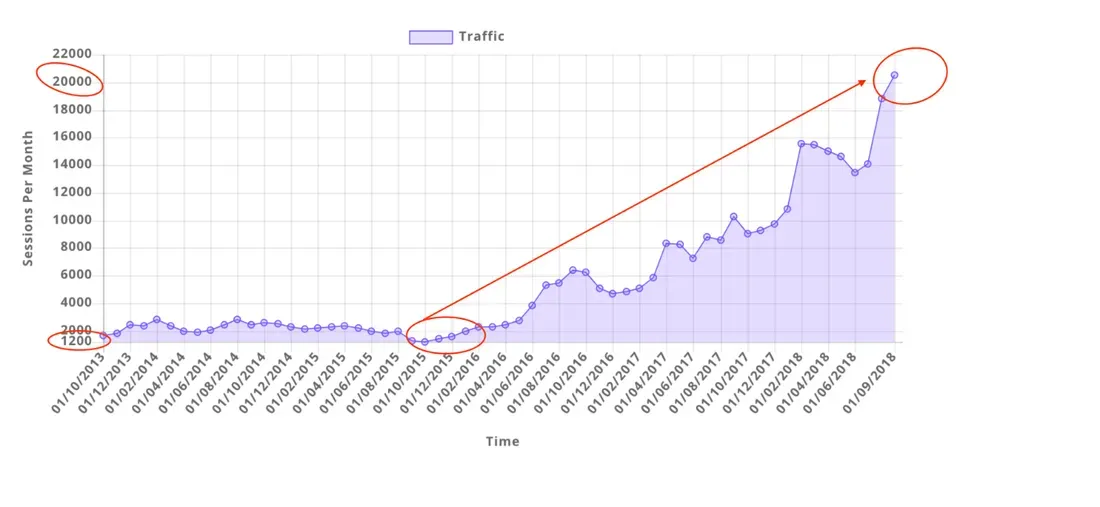
Google Analytics chart showing sessions growing from 1,200 to over 20,000 per month over approximately five years
Analytics: sessions grew from 1,200 a month to over 20,000, a 1,567% increase (2015 to 2018).
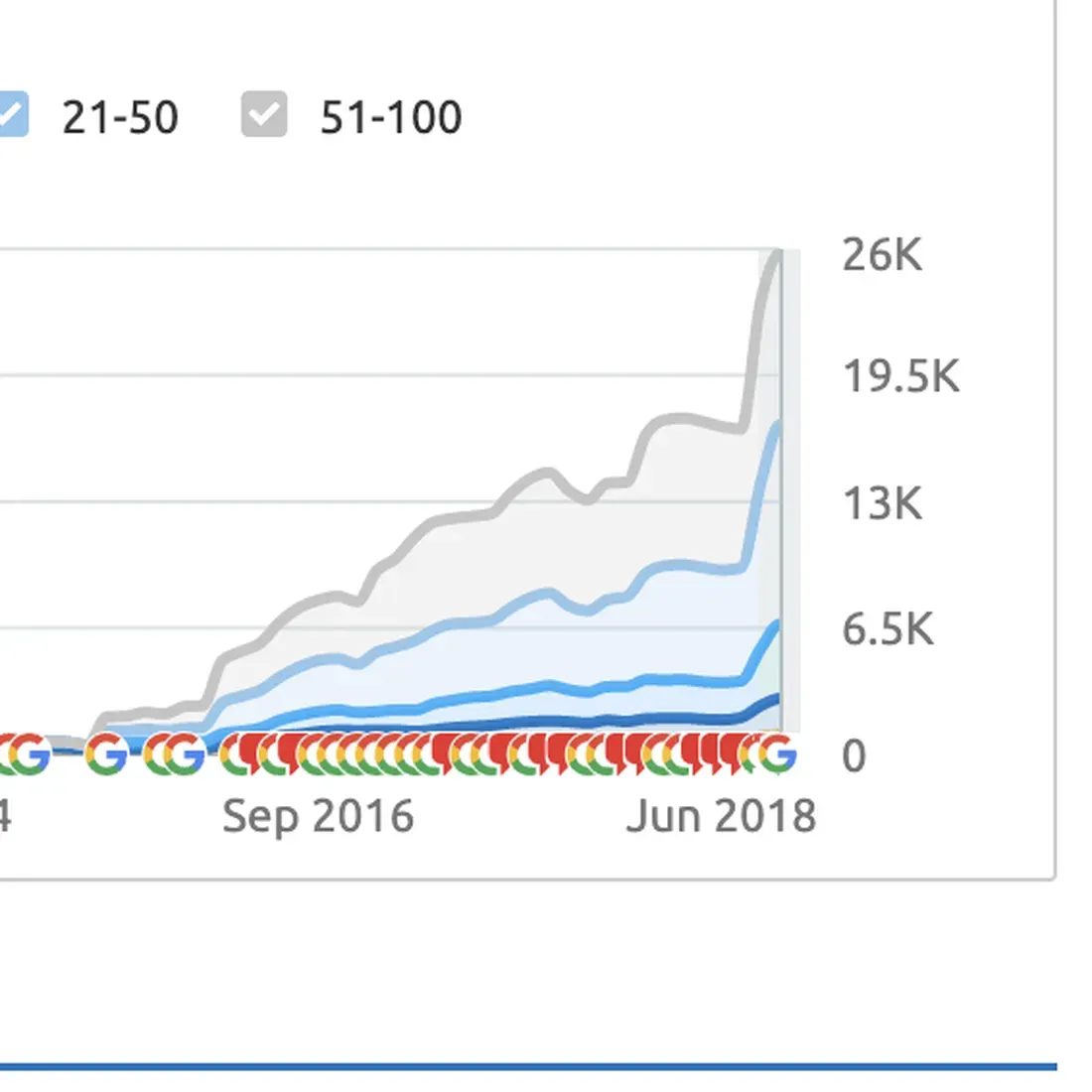
Rank tracker chart showing organic keyword rankings growing from near-zero to over 26,000
Rank tracker: organic keywords grew from near-zero to over 26,000 tracked keywords by 2018.
Organic traffic chart showing recovery from near-zero to over 3,000 monthly visitors after intervention
Rank tracker: organic traffic recovered from near-zero to over 3,000 monthly visitors after we were brought in to fix it (2017 to 2019).

Shopify Partner

Shopify stores built so search can read the whole catalogue, with tracking on every sale.

Google Partner

Partner status you can look up in Google's own directory. Every result above comes with the screenshot behind it.

Book a free strategy call

Where we work

Which industry are you in?

Engagements

Embed what you have, or build your own.

  • Booking flow
  • Time picker
  • Intake questions
  • Data handling
  • Booking events
  • WCAG 2.2 AA

Embed and extend

Booking page

You like your booking tool's own widget, such as Cliniko, HotDoc or Calendly. You want it styled, tracked and placed where people look.

  • Widget styled to the site
  • Booking page and entry points
  • Confirmation page
  • Booking events tracked
  • Accessibility check of the flow
Book a free strategy call

Built around your diary

Custom booking flow

A new practice or a growing one that needs its own flow, with intake and screening before the booking.

  • Everything in the booking page
  • Time picker on live availability
  • Intake written to the record
  • Pre-screening and routing
  • Confirmation and reschedule emails
  • Delivery log with retries
Book a free strategy call
  • Astro
  • WordPress
  • Shopify
  • Next.js
  • React
  • Vue.js
  • Svelte
  • Node.js
  • Tailwind CSS
  • Vercel
  • Netlify
  • Cloudflare
  • WooCommerce
  • Sanity
  • Vite
  • npm
  • Figma
  • Sketch
  • Framer
  • Webflow
  • Adobe
  • Google
  • Google Analytics
  • Google Search Console
  • Google Tag Manager
  • Google Ads
  • Google Fonts
  • Google Cloud
  • Lighthouse
  • Google Gemini
  • OpenAI
  • Anthropic
  • Claude
  • Perplexity
  • Midjourney
  • Hugging Face
  • Visual Studio Code
  • JetBrains
  • Sublime Text
  • Git
  • GitHub
  • GitLab
  • Docker
  • HubSpot
  • Xero
  • Stripe
  • Notion
  • Linear
  • Best Practice
  • Cliniko
  • Coreplus
  • Evermed
  • GetScripted
  • Halaxy
  • HealthEngine
  • HealthShare
  • HICAPS
  • HotDoc
  • Klaviyo
  • Mailchimp
  • MailerLite
  • Medical Director
  • Medirecords
  • Nookal
  • ShiftCare
  • SmartRecruiters
  • Sparrowhub
  • Splose
  • Zanda Health

Tools and integrations

Your website talks to the software you already run.

We pick the platform that suits your business. Then we connect the site to your booking system, your CRM and your ad accounts, so every enquiry lands where your team already works.

Talk through your setup

Client results

Straight from the people who hired us.

babybub Client testimonial
“Up until working with Casey, we had only had poor to mediocre experiences outsourcing work to agencies... instead of needing babysitting like the other agencies we worked with, he was not only completely dependable but also gave us sound suggestions on how to get better results.”
Chris Jellis Domain Health
“Since going with Casey and his team, we have had nothing but wins! They are great communicators, but more importantly, have got awesome results with low lead costs.”
Anneke Founder, Gentle Wombat
“As an experienced health professional I am a hard sceptic. Casey and his team over delivered on my project with an A+ website design having actively listened to every point I was seeking.”
Monica T Google review
“Casey has been an absolute standout! His personalised approach has been nothing short of incredible. We have had amazing results from the get-go.”
Allan Tomlinson Google review
“Excellent company to deal with and their web design is incredible. Would use them again and again.”
Stephanie Poma Google review
“Casey was so empathetic and patient in listening to my ideas. He asked all the right questions and got me thinking on aspects I hadn't considered. He goes above and beyond.”

5.0

5-star Google rating

Book a free strategy call
Jack Duke Care Speech Pathology
“If you're looking for a highly experienced, knowledgeable and ideas-driven marketing agency, look no further... He's helped transform our business from a fairly humble start-up to a fast growing and highly regarded service provider.”
Storm Parker Google review
“We have worked with Casey on a number of website projects and are super impressed with his promptness, communication, professionalism, and knowledge of the full suite of digital marketing... You and your team are second to none!”
Mark Anthony Valle Google review
“[They have] truly exceeded my expectations... They handle every detail with care, addressing any concerns or inquiries I had with remarkable responsiveness and genuine accommodation. The end result was nothing short of fantastic.”

Research & Articles

Worth a read before you hire anyone.

All articles
Hands holding a phone showing a short form with a blue submit button

Conversion 7 min read

Conversion tracking that survives cookie consent

Conversion tracking breaks when people decline cookies or block scripts. How consent mode and server-side events keep your lead numbers useful and private.

Ceramic and brass vases on a stone table in slatted window light, styled like a product shot

Ecommerce 7 min read

Product page design that answers the buyer

Product page design for online stores: what to show, in what order, and what Australian Consumer Law expects of your prices, returns and reviews. A checklist.

Questions

What people ask before moving bookings online.

What you need to know before we start a conversation.

Not answered here? Ask us directly

Which booking and practice systems do you connect to?

Common ones include Calendly, Cliniko, Halaxy, HotDoc, Nookal and Splose. For medical practices we also work with Best Practice, Medical Director, HealthEngine and Medirecords. We confirm what your system allows in week 1, before anything is designed. If a custom flow isn't possible, we tell you straight.

Can people reschedule or cancel online?

Yes, from a link in their confirmation email and within the rules you set. A cancelled time goes straight back into availability.

How is intake information handled?

It's sent over an encrypted connection to your own system and never kept on the website. We ask only what the appointment type needs, and health details never go to an ad platform. We also check your privacy policy against what the flow collects.

Do you write the pre-screening questions?

We draft them with your practitioners, who approve every word. On health services the wording is factual and describes the appointment. It never suggests a result.

How long does an online booking system take to set up?

A styled booking page usually takes about 2 weeks. A custom flow with intake and screening usually takes 6 to 7 weeks, depending on what your booking software allows.

What does online booking cost?

We quote a fixed price after a free 15-minute call, with every line item listed. If your booking software charges for an integration plan on its side, we tell you before you commit.

Will online bookings show up in our analytics?

Each completed booking fires a conversion event, so you can see which pages and ads bring bookings as well as visits. On health sites, ad platforms get a booked or not-booked signal only, and only with the visitor's opt-in.


Book a free strategy call